Try it now —no sign-up needed
Free playful answers, no signup. Your question is processed in your browser.
How do you ask the universe a question online?
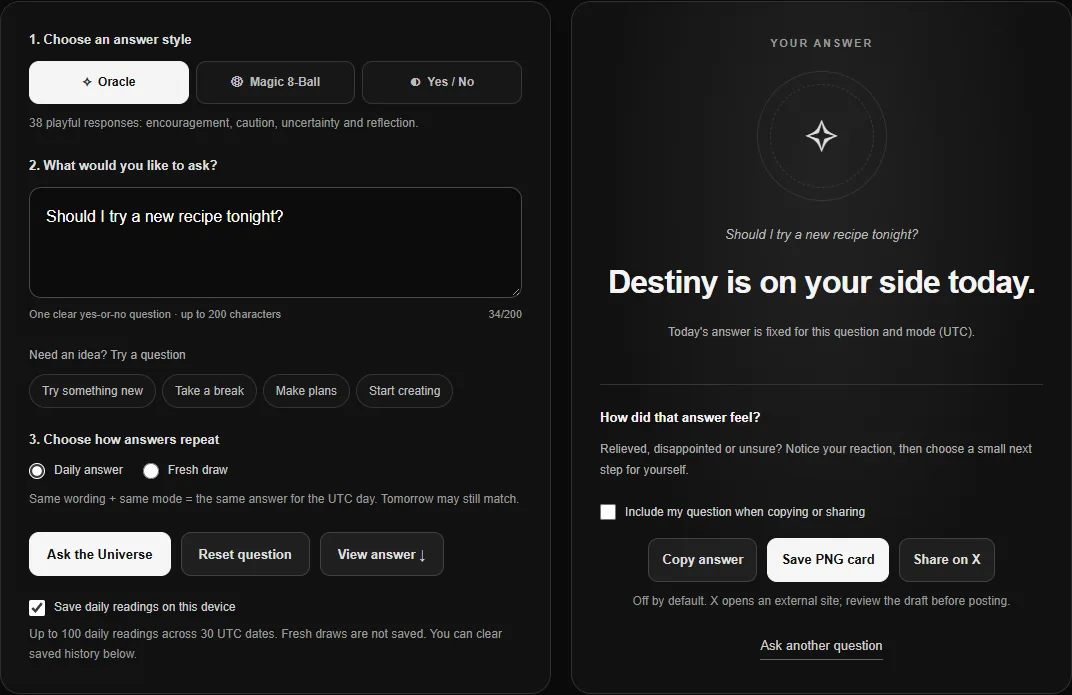
Use ToolKnit Ask Fate to type a clear yes-or-no question, select an answer style and reveal a playful response. The tool is free and needs no account. Despite the cosmic wording, it selects prewritten text in your browser: it does not receive messages from the universe, understand your situation or predict what will happen.
A good first question is “Should I try a new recipe tonight?” It describes one small action and makes sense with a yes, a no or an uncertain reply. A question such as “What is my destiny?” asks for an explanation the tool cannot give. Clear wording makes an answer easier to interpret; it does not make the answer more accurate.
- Choose a style. Oracle gives a longer prompt, Magic 8-Ball uses familiar short replies, and Yes / No gives a binary answer.
- Enter one question. Type up to 200 characters or use a suggested example. On a keyboard, Enter reveals the answer; Shift+Enter adds a line break.
- Choose the repeat rule. Daily answer keeps the same question and mode consistent for a UTC day. Fresh draw makes another random selection each time.
- Reveal, then decide for yourself. You can copy the answer or save a PNG card. Including the question is optional and off by default.
The controls, answers, history and cards work in English and Chinese. Switching the interface language translates the selected answer; it does not silently draw another one.
12 questions to ask the universe, grouped by situation
Start with an action you can actually choose, rather than asking the tool to reveal a fact. These examples are deliberately low-stakes. Replace the activity or time with your own idea; there is no special wording that makes an oracle know more about you.
Everyday choices
- Should I try a new recipe tonight?
- Should I take a short walk now?
- Should I listen to a new album today?
Time with friends
- Should I suggest a picnic this weekend?
- Should we play a board game tonight?
- Should I send a friend a cheerful hello?
Creative experiments
- Should I sketch something just for fun today?
- Should I try a different color in this drawing?
- Should I take a photo of something ordinary?
A change of routine
- Should I read a chapter before watching a show?
- Should I tidy my desk before starting?
- Should I try a different playlist while I work?
Turn a vague question into one answerable choice
Instead of “What should I do this weekend?”, try “Should I plan a picnic this weekend?” Instead of “When will I become an artist?”, try “Should I spend ten minutes sketching today?” The revised question defines an action. The response remains a game, but you can understand what a yes or no refers to.
Avoid combining two choices, such as “Should I go out or stay in?” A bare “yes” would be ambiguous. Ask “Should I go out?” or use a random spinner with named options when you want to choose between several activities.
What about love and relationships?
You may want to ask “Does this person love me?” or “Will we get back together?” A generated answer cannot establish another person's feelings or intentions. If you use the tool for a lighthearted relationship prompt, keep it about your own small action, such as suggesting a friendly catch-up, and respect the other person's boundaries. Honest communication gives information that an oracle cannot.
Oracle, Magic 8-Ball or Yes / No: which should you use?
Choose Oracle for a phrase, Magic 8-Ball for a familiar toy-style reply, and Yes / No for an unambiguous binary result. These are different answer pools, not different levels of accuracy. All three are available on the same Ask Fate tool page.
| Mode | Possible answers | Useful for |
|---|---|---|
| Oracle | 38 written prompts covering encouragement, uncertainty, caution and reflection. | A playful phrase to react to or talk about. |
| Magic 8-Ball | 20 classic-style replies: 10 positive, 5 uncertain and 5 negative. | The familiar experience of a digital question-and-answer toy. |
| Yes / No | Only “Yes” or “No”; no “Maybe”. | A simple choice between doing or not doing a small activity. |
In Fresh draw, each entry in the chosen pool is equally eligible. That means Magic 8-Ball is not a 50/50 yes/no coin toss: its pool includes uncertain replies and more positive than negative entries. Yes / No has two equally likely outcomes in Fresh draw, although a short sequence can contain many of the same answer. If you specifically want heads and tails, open the separate Coin Flip tool.
Oracle's Daily answer uses four response groups before selecting a phrase. Its Fresh draw selects across the 38 phrases. These rules keep the two experiences distinct; neither is a measure of how likely a real event is.
Why the same question can keep getting the same answer
Daily answer is intentionally repeatable. The tool uses the wording of your question, the selected mode and the UTC date. Asking again is not another attempt to obtain a more truthful answer. It simply retrieves or reproduces the daily result.
- “Should I take a walk?” and “should I take a walk??” are treated as the same wording. Capitalization, extra spaces and ending punctuation are normalized.
- Changing the meaning or wording can produce a different result, but it may still land on the same phrase.
- Changing the mode uses that mode's own pool. An Oracle sentence will not be presented as the new Yes / No result.
- The date changes at 00:00 UTC, based on your device clock. For example, that is 08:00 in China Standard Time; it is not everybody's local midnight.
- A new UTC date recalculates the result. It does not guarantee a different response.
Fresh draw is the setting for another independent random selection. It does not save those draws into the daily history. Repeats are normal here too. Turning off history or pressing Reset question does not alter the Daily answer calculation.
If you find yourself repeatedly changing the wording until you get an answer you like, stop and consider the outcome you were hoping for. That can be a useful conversation starter with yourself, but it is not proof that the final draw is correct.
Three simple ways to play without overthinking it
1. The small-adventure prompt
Choose one harmless change to your routine: a new recipe, a different album or a ten-minute sketch. Ask once, read the response, and decide whether the activity still appeals to you. An uncertain answer can simply mean you choose for yourself. You do not need to keep drawing.
2. A friendly question round
Take turns asking lighthearted questions such as “Should we try this board game?” Use Fresh draw so each turn is a new selection. Keep personal or uncomfortable questions out of the game, and let anyone skip their turn. For choosing from several named games, a spinner is clearer than asking many yes/no questions.
3. A private daily check-in
Use Daily answer for a small question you want to revisit later. With saving enabled, open a saved reading to see its original question, answer, mode and date. Notice whether your reaction changes. You can delete the entry afterward; there is no need to maintain a public journal or create an account.
An answer can be entertaining without being advice. Do not use this tool to make medical, legal, financial, safety or other consequential decisions. It cannot assess evidence or replace a qualified person.
Where questions, history and downloaded cards go
Answer generation runs locally in your browser. It does not send your question to a prediction or AI service. This is separate from the website's ordinary visit analytics; see the site privacy policy for that wider context.
When Save daily readings on this device is on, the browser retains up to 100 daily readings across the latest 30 UTC dates. Old records are pruned when the tool is opened or used, not by a background process while the browser is closed. Fresh draws are not added to that history. Storage is local to this browser profile; changing devices does not synchronize it.
- Stop new saves: turn off the save-history checkbox. Existing records remain available.
- Delete one reading: use the × button beside that record.
- Clear saved history: confirm the clear action. Other tools' data and the current visible answer remain unchanged.
- Copy or download: the question is omitted by default. Enable “Include my question” only when you want it included in the copied text or PNG card.
- Share on X: this opens an external draft containing the selected content. Review it before posting. Downloading a card does not create a public link.
A PNG card includes the selected answer, mode, UTC date and an entertainment label. It reflects the current interface language. After changing a question, reveal its answer before exporting; editing the input alone does not rewrite an earlier result.
Troubleshooting answers, history and downloads
| What you see | What it means or what to do |
|---|---|
| The answer does not change | Check Daily answer vs Fresh draw. Daily consistency is intentional; random draws can repeat too. |
| Nothing happens after pressing Enter | Use a question with a letter or number. Finish any text-composition input first. Shift+Enter inserts a line break. JavaScript must be enabled. |
| History is missing | Check the browser profile and the Today / All saved dates filter. Private browsing or cleared site data may remove it. Fresh draws are not saved. |
| Storage is unavailable | You can still ask. New daily readings stay in this page's memory, so do not rely on them surviving a reload. |
| An old Yes / No record says “Maybe” | That is a preserved record from the older version and is marked as such. New Yes / No answers have only two outcomes. |
| Copy fails | The browser may block clipboard access. Select the answer text and copy it manually, or save the PNG card. |
| No download is visible | Check the browser's downloads and download permissions. The notice means a PNG was prepared and handed to the browser, not that it was verified on your disk. |
Common questions about using an online oracle
Can I ask an open-ended question?
You can type one, but the fixed answer pools are designed for yes-or-no prompts. For an open-ended choice, list your options first and ask about one concrete action, or use a spinner with those options.
Does a disappointing answer tell me what I really want?
It may give you something to reflect on, but a reaction is not a reliable test of your hidden wishes or the right decision. Treat it as one feeling to consider alongside real information.
Can I share an answer without making my question public?
Yes. Leave Include my question unchecked before copying, saving a card or opening the X draft. Review the result before sharing it; a downloaded card stays local until you send or upload it.
Will deleting history give me a new daily answer?
No. Daily answer is calculated from the question, mode and UTC date. Deleting a record removes the saved copy, not that calculation. Choose Fresh draw if you want a new random selection, which may still repeat.
Updated October 23, 2026. This guide describes ToolKnit's three answer pools, daily and fresh-draw rules, and local history controls. It makes no claim of predictive accuracy.
Ready to give it a try?
Ask one small question. Choose the answer style that suits your game.